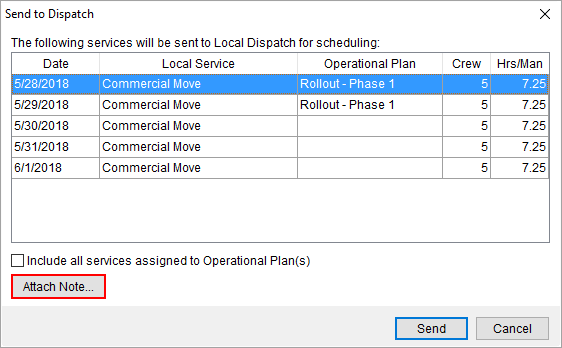
A Dispatch Note is a memo attached to a service to provide specific information on the service to dispatching. Create the Dispatch Note through the Attach Note option from within the Send to Dispatch dialog.
Figure 91: Send to Dispatch
You can specify any size of text memo needed within the provided dialog.
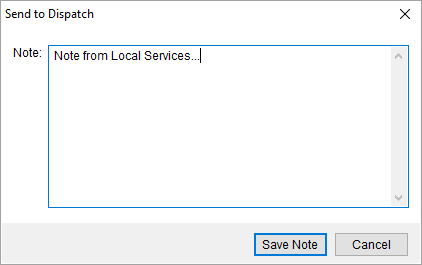
Figure 92: Note prompt from within Send to Dispatch
Press Save Note to keep the changes you make to the
note. Once the services are sent to Local Dispatch, then the Dispatch Note is
available through the  icon within the Note column
within the Dispatch Center
and Requested Services
data grids. If the
icon within the Note column
within the Dispatch Center
and Requested Services
data grids. If the  icon appears in the Note column, then
no note is attached to the service.
icon appears in the Note column, then
no note is attached to the service.
You can also view the note through the Notes and Order Notes tabs, as well.
The information displayed for the note includes a Type of Local Dispatch and a Subject of Dispatch Note.
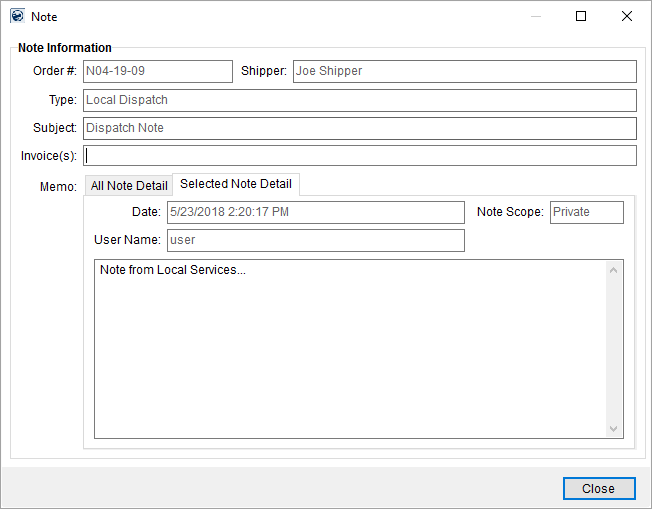
Figure 93: Note dialog
RELATED TOPICS: