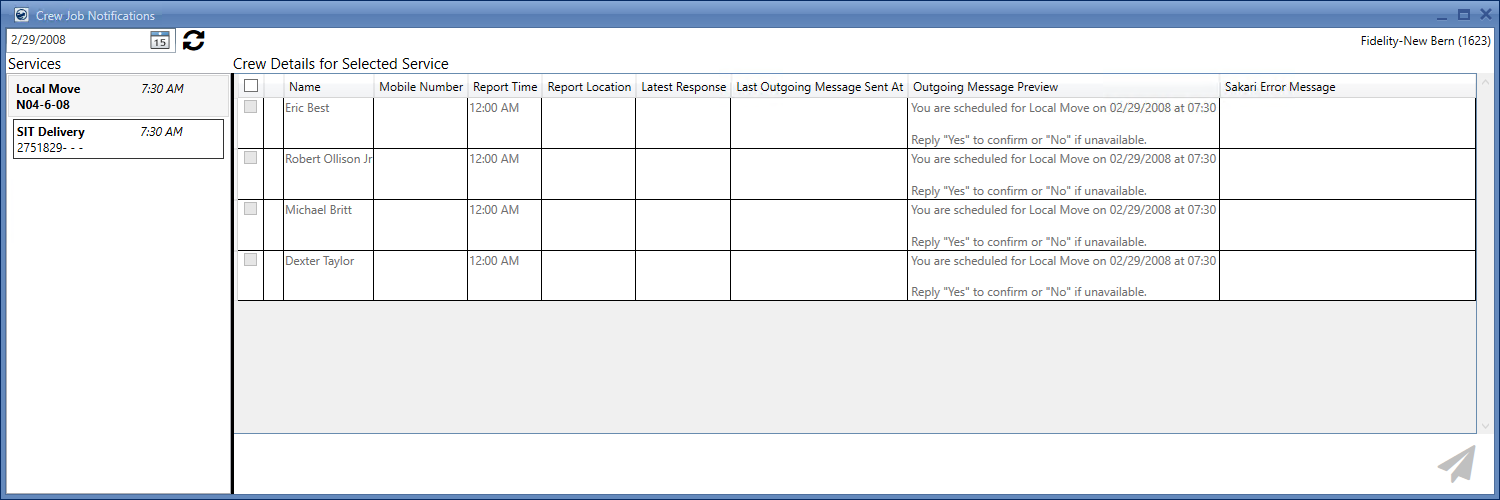
The Crew Messaging Services appear in the form of a list at the left side of your main Crew Job Notifications screen, displaying all the services available for the selected branch and date. Each service listed on this pane displays basic information regarding the service including service type, time and order number.
Figure 8: Crew Job Notifications screen
For each service loaded in the Crew Messaging Services pane, a Crew Details for Selected Service table is maintained at the right side of your Crew Job Notifications screen.
Technical Field and Function Information
|
Field/Function |
Description |
|
Service Type |
Displays the service type as picked from the Dispatching Common View. |
|
Service Start Time |
Displays the service start time as picked from the Dispatching Common View. |
|
Displays the Order Number to which the service is tied. | |
|
Response Status |
Displays a count for all the response statuses for each service. The color pattern for these numbers is: Confirmed/Yes Unknown/Response Awaited Denied/No Refer to the Latest Response From Crew topic for more information on this column. |
Related Topics
Crew Details for Selected Service