MoversSuite Administration > QuickBooks > QuickBooks Item Mapping
Use this setup to link MoversSuite item codes to services and accounts defined within your QuickBooks system. This setup enables transfer of needed data to support accounting transaction generation between the MoversSuite and QuickBooks.
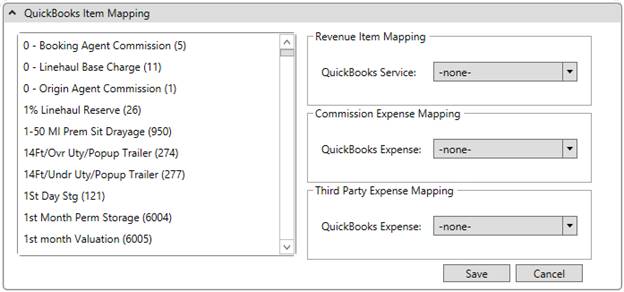
Figure 5: QuickBooks Item Mapping Setup
This setup is divided into two sections. The section on the left lists the MoversSuite item codes. The section on the right allows you to choose a QuickBooks item to map to. To use this screen, select one or more item from one of the mappings on the right and then select the MoversSuite item codes on the left side that it links to. MoversSuite highlights the item codes that are selected or saved for the particular mapping.
You can assign multiple MoversSuite item codes to a single QuickBooks mapping. However, you cannot map the same item code twice. For example, if you have a QuickBooks Service of “Storage” to Item Code 5000, you cannot map a second QuickBooks Service to Item Code 5000.
|
Field |
Description |
|
Item Code |
The section on the left displays all MoversSuite item codes defined within Item Code Setup. Items highlighted in the pane are linked to the mapping selected on the right side of the screen. |
|
Revenue Item Mapping |
Select items defined as Products and Services within QuickBooks and link them to MoversSuite item codes selected on the left side of the screen. These QuickBooks services correspond to items you want included on AR invoices.
Note: Only active Products and Services are available to select from. The application references the Description for the listed Products and Services.
|
|
Commission Expense Mapping |
Select GL accounts defined within QuickBooks and link them to MoversSuite item codes selected on the left side of the screen. These GL accounts are for expenses associated to commissions paid out.
Note: Only active Chart of Account general ledger accounts are available to select from. The application references the Name of the Chart of Account items associated to a Type of “Expense.”
|
|
Third Party Expense Mapping |
Select GL accounts defined within QuickBooks and link them to MoversSuite item codes selected on the left side of the screen. These GL accounts are for expenses associated to third party expenses.
Note: Only active Chart of Account general ledger accounts are available to select from. The application references the Name of the Chart of Account items associated to a Type of “Expense.”
|
|
|
Save Press this button to save any changes made to this setup. |
|
|
Cancel Rejects all changes made to this screen. |

