Setup Area: Customers > Contact Info tab > Contact Person section
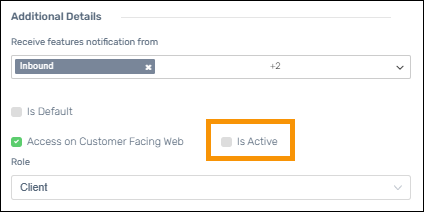
A new Is Active option allows you to disable a Customer Facing Web (CFW) user’s login access without deleting the contact. The Is Active option is only visible when the “Access on Customer Facing Web” box is checked on a CFW Contact. By default, the Is Active option is checked for existing users and when a new contact is granted access to as a CFW user.
When to use this
•A user leaves the company
•A user changes roles and no longer needs access
•Temporary access needs to be revoked
How to make a CFW user inactive?
Note that the Inactive option is only visible when the “Access on Customer Facing Web” box is checked on a CFW Contact.
1. Go to Customers > choose Customer > Contact Info tab > and select a user from within the Contact Person section.
2. Click the Edit icon for the contact.
3. Within the Additional Details section, uncheck Is Active.
4. Click Save.
To restore access, just check the Is Active option and save.
Figure 5: This CFW user is inactive as the "Is Active" option is not checked.